Showing posts with label Open Source. Show all posts

[Retrospect] OpenMRS Worldwide summit 2015 & my involvement with the project so far.


OpenMRS is an open source medical records system. I was first introduced to the OpenMRS by one of the brothers who taught me about Google summer of code, Mr. Nirmal Fernando. Thats back in the 2011. Well now its 2016 and i think i have came upon long way with this open source project. Its nearly 5 years. wow! I am really glad that i found this amazing open source project which tries to solve healthcare information technology related issues and ultimately helps for a worthy cause. This open source project is a massive community consist with doctors, healthcare workers, professors, Software engineers, Software architects and HealthIT professionals.

Since its 5 years and i thought its the high time to retrospect about my involvement with the project so far. So first let me list down my OpenMRS related milestones to-date.
  • Introduction to OpenMRS in late 2011 - Sinhalese localization & bug fixes.
  • Became Google summer of code student on 2012
  • Participated OpenMRS implementers conference in Manila, Philippines.
  • Became Google summer of code student on 2013
  • Participated FOSSASIA 2013 conference and gave a talk on OpenMRS at Phnom Penn, Cambodia.
  • Participated FOSSASIA 2014 conference and gave a talk on OpenMRS at NUS, Singapore.
  • Became Google code in mentor in 2014
  • Proud to became one of the best Google code-in mentors & got a wonderful opportunity to represent OpenMRS at Google HQ, mountain view.
  • Became Google summer of code mentor in 2015 

And yes, OpenMRS world summit 2015 is the latest & i am really glad i have participated for it.
Despite of my physical illness which i got infected in the last 2 days, I really enjoyed the every bit of it.


Event was very well organized by the OpenMRS staff. Singapore management university was a really good venue. So much easy access to the venue with convenient transportation by MRT which is also quite cheap. I really don't want to mention much about the food because i don't like Chinese like food much which are very popular in SG, but there's a city called 'little india' for south asians like us to consume much tastier food similar to the ones we have in home countries. :) Singapore is a very nice country consist with very interesting places to visit. Marina bay sands was one of my favorite places in SG. And cannot forget other cool places such as gardens by the bay & Senthosa island.


Sessions on the summit was great.

  • Cloud Computing for OpenMRS Data Analysis
  • Project Buendia: In-Depth
  • Project Bahmini & how indian folks tries to solve the healthIT related problems in india.
were few of my favorite talks in the summit. I really loved the way Bahmini tries to solve the health related problems in india but we being Sri Lankans (very near country to india) still don't use proper healthcare IT software for our government hospitals. 


Audience -- well our community.

There were lots of people around the world participated to the summit. Proving that Sri Lankans are everywhere in world doing cool stuff -- I met Harsha Kumara who is an another former GSoC student & current mentor from Sri Lanka (actually we were sharing the same room to save some money from our lodging cost for OpenMRS.) And after few years met my old friend and a brother Suranga Kasthurirathne, who departed to US for his Phd in Healthcare informatics. He seems to be doing really great with OpenMRS as a staff member now and wish him good luck with his future studies. Luckily we also met a doctor from Sri Lanka who was also very enthusiastic about OpenMRS and having an idea to implement it in Sri Lanka. We had a slight chat with Dr. Paul Biondich & discussed about how to get this thing done.


From Left: HarshaK, Me, Dr. Paul, Doctor from SL, Dr. Burke, Another gentleman -- really sorry i don't remember the name of him.

From left: Me, HarshaK, MayankS


I also met Mayank Sharma who was introduced to OpenMRS last year by me & downey at the FOSSASIA summit in Singapore. Looking at his work now, we are really glad that we found him. He really does a great job to OpenMRS being a Branch manager now. Kaweesi Joseph was one of my cyber friends at OpenMRS since 2012 but we never had meet in-person. I am really glad we met at the summit. He is a really cool guy, started as a student and doing a massive job to the project now. Jordan is still a cool girl, i met her back in the days (2012) at Philippines summit and glad to meet her back.

From left: Me, MayankS


From left: HarshaK, Me, DanielK


Ever supporting mentor Daniel Kayiwa, I am glad to meet him back in the summit. There were numerous people i met in the summit including. Dr. Burke, Wyclif, Dr. Andrew, Pascal, Ellen, Robby, Maurya and many of others. I am really glad to be part of this amazing community consist with great brains.

Team getting ready for lightning talks


In lightning talks event, I have a done a brief speech to the participants on "OpenMRS iOS Client" From the responses i got i think quite a lot of people liked the project and the idea. 
 

The OpenMRS worldwide summit 2015 was a great experience and i really appreciate OpenMRS LLC for sponsoring me with a travel grant. It really was a invaluable experience to gain knowledge on healthcare informatics.


Mentioning about my future plans with OpenMRS project, I always wanted to contribute OpenMRS whenever i can. These days i'm quite busy with my masters thesis and my day job as usual. I hope i could do more things and contribute OpenMRS in the months to come. So this is not the end of my engagement with this wonderful open source project and hopefully it should be a life long journey!

"Write Code, Save Lives" - Join with OpenMRS.

Thank you,
Harsha


Software Licensing facts (Open Source/Proprietary)


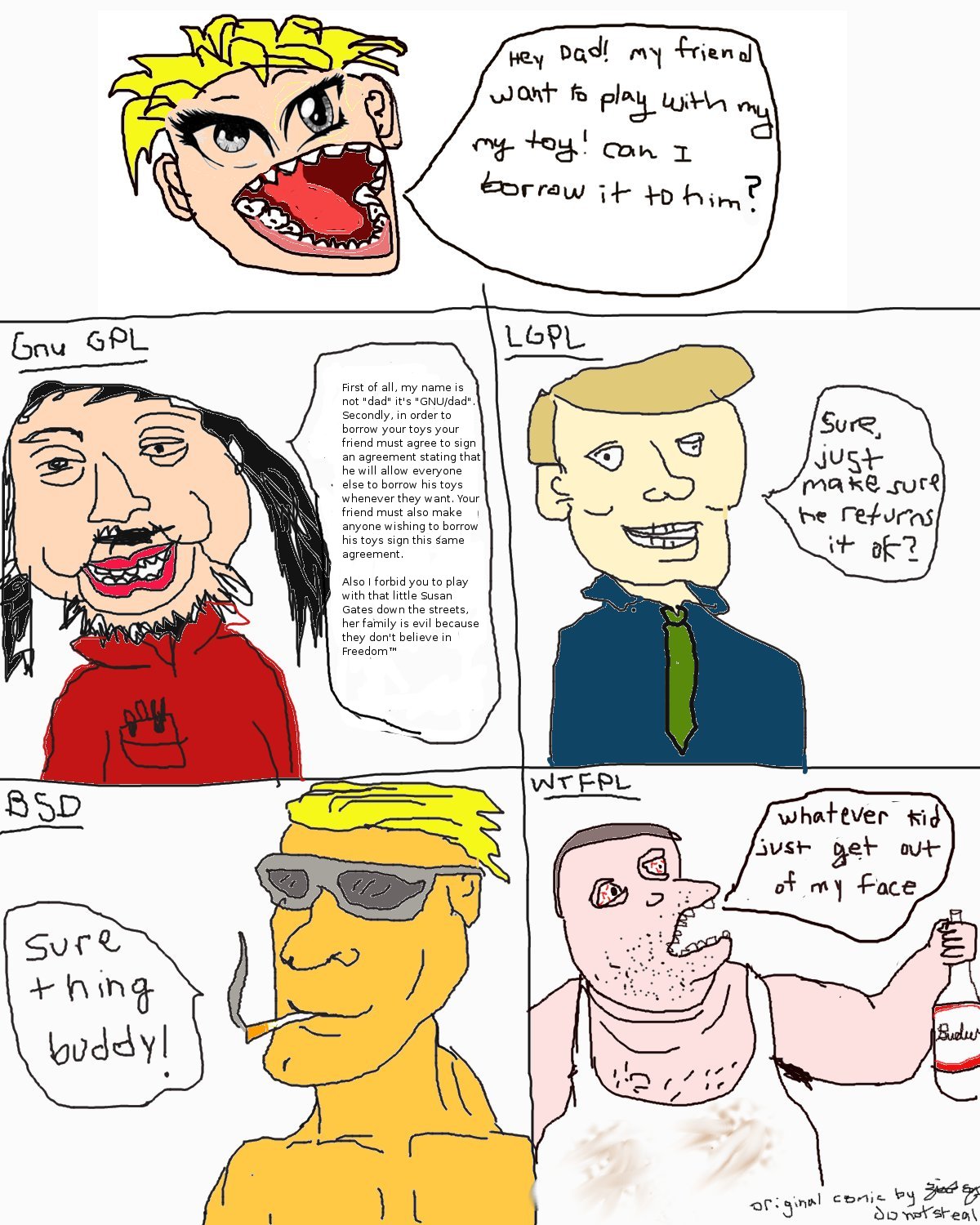
There are three main families of free software licenses:
> permissive, weak copyleft and strong copyleft.

Permissive licenses (MIT, BSD and Apache in your list) allow use of your code in proprietary projects without sharing back either their code or your code, if they modified it.

Weak copyleft licenses (LGPL, MPL in your list) allow use of your code in proprietary projects, but they should share back your code under the same license if they modified it.

Strong copyleft licenses (GPL) require that they distribute their own code under the same license (GPL here).


Free and Open Source software doesnt need to be distrbuted for Free
Understand the concept like this: Think of “free speech”, not “free beer” ("Free" means "Freedom" not "Zero Cost")

The word “free” has two legitimate general meanings; it can refer either to freedom or to price. When we speak of “free software”, we're talking about freedom, not price. (Think of “free speech”, not “free beer”.) Specifically, it means that a user is free to run the program, change the program, and redistribute the program with or without changes.

References:
  1. http://stackoverflow.com/questions/2700069/which-is-the-best-license-for-my-open-source-project
  2. http://www.gnu.org/philosophy/selling.html.en


Google Summer of Code Meetup held at Colombo, Sri Lanka


We held our first Google Summer of Code meetup at Sri Lanka Institute of Information Technology (Colombo, Sri Lanka) on the 4th of March 2013. The event was organized with a great support from the Department of Computing. Approximately 150 young enthusiasts took part in the event. 


The first speaker was Keshan Sodimana, who is the Manager of Google Developer Group, Sri Lanka. Keshan delivered an excellent presentation on the value of Open source software for the world. 


I took the stage next to present students with an overview of the Google Summer of Code program.  I also focussed on general open source fundamentals from communication within open source communities to proper email/IRC etiquette and open source culture. 


The final speaker was Suranga Nath Kasthurirathne, a mentor and past GSoC student for OpenMRS. Suranga discussed general information about Google Summer of Code such as important dates for the program, how to apply, guidelines on how to write project proposals, and how to come up with the most suitable project per student. 


The program was concluded with a session on related technologies. This included an OpenMRS demonstration as well as other related tools which would help students to come to grips with GSoC 2013.


The students were very excited about the program, and asked many questions both publicly and individually after the session ended. We tried to clear up doubts they had about their own abilities, and encouraged them to participate. 


We also pointed out the benefits of working on real-life projects, as opposed to the mock projects that they work on in university. We also explained the value of building connections all around the world, and the spiritual happiness open source projects brings in general. Those of us who had participated as students with Google Summer of Code shared our experiences on why it was important to continue with a project after GSoC was over, and what benefits it could bring you.

Good luck for all the hopefuls applying for Google Summer of Code this year. May the most determined win!

By. Harsha Siriwardena, former Google Summer of Code student for OpenMRS 2012, Google Code-In mentor for the Fedora Project 2012 and Organizer of Google Developer Group Sri Lanka.

Received my Google Code-In Mentor T-Shirt!


Recently I received my "Google Code-In Mentor T-Shirt" from Google for mentoring students of the Fedora Project for GCI 2012 :-)


Glad to see this blog article written by one of my students at GCI 2012, At the period of Google Code-In, Apart of mentoring the student for the targeted GCI-TASKS I tried my best to teach the students basics of Open Source culture and awesomeness of contribute to an Open source project. Glad I saw most of the students have got the true mean of the Google Code In and Open Source software itself.


Harsha Siriwardena
Google Code-In Mentor for Fedora Project 2012

_____________________

Links
[1] Fedora Project GCI dashboard: http://www.google-melange.com/gci/org/google/gci2012/fedora
[2] http://fedoraproject.org/wiki/GCI_2012

Clone, Build and Run OpenMRS for the first time [A n00b Guide]


I have heard lot of issues from the people who are new to OpenMRS development. So thought to write my own guide. Most convenient way for me is using the Maven command line. No need of IDEs you can build and Run OpenMRS without any hassle.

These instructions will work within any platform regardless of the OS, You may need to configure the path variables first of all to use them on terminal. (How to Set Env. variables for Maven?)

Here are the simple steps.

Prerequisites: Apache Maven, JDK, MySQL server

1. First Clone the Git Repo: https://github.com/openmrs/openmrs-core

2. Navigate to the /<path>/openmrs-core/ directory using command line.
Fire > "mvn clean install"

You will need internet connection at this point. Cause maven will download all the required dependency jars from servers. First build will take a quite a lot of time depending on your Internet connection. In second time and so forth It will build really fast within few seconds. 

So dont worry about itAfter the first build to speed up the build process, you can use "mvn clean install -DskipTests"  command to skip the junit test cases. First time you need to build with test cases so you need to use the "mvn clean install" command.
 

3. Navigate to the /<path>/openmrs-core/webapp/ directory using command line.
Fire > "mvn jetty:run"

4. Now browse "localhost:8080/openmrs/" and you are done.

Really simple :-)

If you have come up this far you have already built the code and Ran OpenMRS system by yourself in your PC, Satisfied coder and ready to play with the code base. :-)

So IMHO After trying these steps try to import the project to Eclipse/IntelliJ and see.
Sometimes Eclipse gives crazy errors, (crashes, proxy, and lot etc) So OpenMRS starters tend to get demotivated by facing those little issues. We can blame Eclipse for it, Which is not a fault of OpenMRS code base :-D


Further Reading: https://wiki.openmrs.org/display/docs/Getting+Started+as+a+Developer

Hope this helps!

Regards,  
Harsha


Open Source - OpenMRS awareness session held at University of Peradeniya, Sri Lanka. "Write Codes, Save Lives"


The most important fact Google Summer of Code taught me is the value of Open Source. And the value developing of Open Source software for the world, for the sake of people who lives on it. Open Source is simply altruism. For whom we code like this? Not for anyone, Just for the well being of ourselves. Simple as that! I was worked for OpenMRS in last summer at GSoC. So the programs I have contributed may be using in actual hospitals, clinics some day. People may love those program. They may get the maximum use out of it. But still those software's are Free. Not commercial ones.  Worth Millions but my Organization OpenMRS giving the Software for Free. See how awesome it is. For the sake of humanity, for the sake of entire world that invaluable software giving for free!

I totally love this concept by now, So I am trying to get involve with Open Source as much as I can. (even at my office time breaks i tend to do it.) Do whatever you can, They dont ask donations or other support. Just simple workforce can effect a lot value for the Community.

Being an Open Source enthusiast, Last week I have attended for an Open Source Event Organized by Computer Engineering faculty of University of Peradeniya, Kandy, Sri Lanka.


Computer Science and Engineering faculty students who participated the event.


There I met lots of former GSoC students and Engineering students who are really interested at Open Source. Glad I met Buddhike Kurera who is the Summer Programs Admin of Fedora Project at the event. He gave a lightning speech about open source and the Fedora's role in open source world.


Mr. Buddhike Kurera from Fedora Project speaking about Open Source software

There were various sessions about Open Source and clarifying the value of them. It was a great pleasure for me I got a 15 mins Session to present the audience about OpenMRS.

In their I introduced the people Whats OpenMRS and where OpenMRS being used today.
Actually they were amazed seeing those. Even the Engineering Faculty of the University where I was talking at are using OpenMRS as a research tool, pretty cool right? :-)

GSoC is a good entry for involve in Open Source. So I taught them why they should select OpenMRS as their Organization in next GSoC (if its gonna happen)

I made below slide to present in my session.


My speech about OpenMRS


The event was a big success, There were around 75 potential Computer Science and engineering students participation. I think they have gained lot knowledge about OpenMRS, Fedora and Open Source Software at the event. After couple of days, as I mentioned in the presentation I saw few Students who participated have posted welcome messages at OpenMRS mailing lists too. That was my ultimate expectation, More contributors for the OpenMRS community, more beautiful things we can get done collaboratively.

Finally I am really glad I have done this, my contribution which I need to do for the World and for the sake of my Organization, OpenMRS.

නමෝ බුද්ධාය. "Write Codes, Save Lives - Join with OpenMRS"

Regards,

Harsha Siriwardena
Community Developer
Former GSoC Student, OpenMRS 2012

Be an #OpenSource Supporter, Mentorship for Google-Code-In program #GCI


Last week I have attended to an Open Source event organized by Computer Engineering Faculty of University of Peradeniya, Sri Lanka. In that event I met Buddhike Kurera, who is the Admin of Summer Programs at Fedora Project. In the 1st session he gave a lightning speech about open source and the Fedora Projects role in open source world. In the latter part he talked about the Google-Code-In program one of the events organized by Google for the young kids ages of 13-17 which is happening these days. 

10 Young Champions of GCI 2011


Its a pretty interesting program. So I also thought to contribute this wonderful event.
Younger people are the future of our world. If they got understand the true meaning and value of open source after they grown up surely they will do their best to contribute open source by means its the development of World and Development of Free and open standards.

Since my GSoC Organization OpenMRS hasn't been selected for the list of Organizations this year, I thought to apply for GCI mentor-ship via Fedora Project. And just 1 day ago I have became a Mentor for Google-Code-In program. So in the coming days I will be mentoring young kids for the sake of Fedora Project :-)


This is just a good and simple way to contribute and show your love toward open source.
If you like to become a mentor you are still not that much late. another 24 days yet available to the program ending.

Good intro slides to understand the Basics.
Slides taken from Pradeeban Ayya's Blog.


So Adult programmers, matured students, former GSoC students should become mentors and support this wonderful open source event.


Steps are follows (these info given thanks to Buddhike Ayya)

1. Create a profile in GCI 2012: 


reg as a mentor using this link..
http://www.google-melange.com/gci/profile/mentor/google/gci2012


2. Ask for the mentorship via GCi 2012

aftr that goto menu > request mentor > fedora > writs something abt u.
ur work and bla bla no more than few 5-10 lines


3.When it is approved monitor some task on the list and review them
with the student (please inform the primary mentor before that)
4. After reviewing 2 tasks you can submit two tasks which are fedora related.
5. Then you need to complete it by instructing the student.
6. Repeat adding tasks.

Thats the procedure. Read more and get more knowledge before proceeding cause this is not just an ordinary event, you are dealing with Professional Open Source communities. Respect each others! , Don't cross your limits,
use common sense.

Happy FLOSSing! peace.

Regards, 
Harsha Siriwardena
Former GSoC Student, OpenMRS 2012


Ralapanawa Android Module Open Sourced!


Ralapanawa Android Module is one of the Mobility modules we have developed for Ralapanawa RND project. This project has used wide variety of features and functionalites on Android Technology. So finally we thought to Open Source the whole source code for the sake of other newbie developers specially for educational purposes.

Some major functionality.
  • Graphical illustrations (Charts)
  • Data tables to populate bulk data.
  • Handling KSOAP client to fetch SOAP web services within Android.
  • Handling REST web services.
  • SMS based services.
  • Feedback Functions. (Consumer to Dev)
  • Showing Progress bars while handling UI Threads
  • Grid views for menu.
  • UI theming
  • and many more..

-------------------------------------------------
 Ralapanawa.Mobile.Module - README
-------------------------------------------------

Android Derivative of the Ralapanawa Centralized Web Service

Released Under: MIT License 2012 Harsha Siriwardena

@authors: harshadura, dewmal

Download App from Google Play Market:
https://play.google.com/store/apps/details?id=org.ralapanawa.mobile.android

For more info visit project blog:
http://www.ralapanawa.org/


Please note we have wasted our good precious time to create this wonderful product. So if you gonna reuse our work in someway, please mind to give proper credit to us. Thanks!

- Harsha


End of GSoC thoughtz, OpenSource Software and my project at a glance!


Well, After long time of hard work with coding stuff, GSoC has come to an End ! I am extremely  happy to say about my experience which I got on these last few months during my Google Summer of Code Internship at OpenMRS. I real loved my project and the marvelous Open Source Community I have worked with. By any chance If you are not aware about OpenMRS, the name says what it does, It's a Medical Record Management System made for the developing world. "Write Codes, Save Lives!" how cool intention, isn't it ?


Okay! Now I will tell you bit about my GSoC project. My project is Better Error Submission process for Feedback Module, Basically this is an extension of the Project called General Feedback Mechanism of OpenMRS. The new version of OpenMRS Feedback Module follows some of the cool features in Google Feedback tools. (something like Automated Screenshot capture and edit process within web browser, You may have seen that functions or may have tried it in YouTube or somewhere else on Google Products, if not you can try that from here.) My project is a Web Based Java EE Application, Of course its an OpenMRS Module application. 60% of entire project coded in JavaScript, Jquery (I had real nice time working with these JS stuff lol) 40% of it has coded using Java and related its server side technologies.


OpenMRS Feedback Module v2.0 at a Glance

What's New ?
  • User friendly, Wizard driven Feedback Form
  • Automated Screenshot Capture/Edit process within Web Browser.
  • User-to-User Communication within Feedback System. (Comment System)

About Feedback Module v2.0

Basically Feedback module provides a mechanism for users to communicate with system Supporters/Admins with system-related (non-patient-specific) messages. In this new version of Feedback module provides a really cool feature which will automatically Capture the Screenshot and allow user to edit it (highlight/blackout) within Web Browser itself. So this will reduce the time taken to process Screenshots manually. And the users will able to submit their problem/feedback directly to the most responsible person rather than same Admin. Multiple OpenMRS users can be mapped into a single Feedback Ticket by Admin, So faster problem solving can be happen. User-to-User communication is a great way to interact with other users regarding a Feedback Ticket in this new version of Feedback Module.


You can read User Documentation from below link.
Feedback Module - User Documentation


Installation and Usage


OMOD file is a specialized WAR file which is used as a OpenMRS Module file installed as plugins into OpenMRS System. Installation isn't just straight forward thing, So if you aren't aware of installing OpenMRS modules, I prefer you to watch the Demo Video below to get an idea how it works! :)


I must say! Entire OpenMRS community is really nice and helpful! They are like a family working towards a single goal to make the world even better place to live. They helped me every time when I was in trouble. For my Coding problems to Technical issues I got great support from #openmrs IRC channel and mailing lists.

I can't never forget my Primary Mentor, Gaurav Paliwal. He helped me every time when I was in trouble and guided my path all the time. I have to thank alot for his great commitment done for me.  And my Backup mentor Ben Wolfe, being a Core developer of OpenMRS his advices were really helped for me to get succeed in project work too.


I have completed main goals and objectives of my GSoC project, And now GsoC is over! Well is that all over now....? Nope its not! I am not going to run away from this wonderful place where I learnt lots of Coding, gained lots of knowledge about Open Source software and Community involvement. I'll definitely stay with OpenMRS in future too. I know Thats the true spirit of Open Source software development! 

OpenMRS is a really cool Open Source Project, If you are skillful in Java you should definitely join to it. Not only coding, There are so many other things available to do, If you are skillful in technical writing stuff you can contribute by documenting wiki docs, You can contribute by help testing product, etc. Don't forget your work is not just a task, Thats a hard work done for the sake of Humanity, For the intention of saving lives! You can proud being a part of something huge! Your contribution for this great project will be an indirect help for the well-being of Global Healthcare.

"Write Codes! Save Lives!" Code for Humanity, Join with OpenMRS !

නමෝ බුද්ධාය! Thank god for giving me the strength to successfully complete my Google Summer of Code Internship at OpenMRS.org ! This is one of my lifetime achievement indeed!

"Nothings Forgotten. Nothing's ever forgotten."

Regards,
- harshadura

Tri-Bhasha-Learner, finally Open sourced !!


Tri-Bhasha-Learner passed 500 downloads and we jz stopped updating this App for further, Finally we have Open Sourced the entire source code at Github so any one who interested can do WTF want with that code now! ;)

At the beginning we had to make this project from the Scratch as we didn found any sample codes which is similar to the idea we needed to implement, So we had to work hard to write those controller parts from scratch and handle localized languages cause those arent natively supported in the Android platform.

Finally I have to thank our Dev Lead of this App, Dewmal for his great commitment to create this kinda awesome App and Thanks all friends for trying this Application!
 
See ya!
 -harshadura


Open MRS පලමු අදියර.


හරි අපි මේ මහා පුණයකර්මය ආරම්භ කරන්නයි යන්නෙ..
වැඩේ ගැන ඔයා තවම හරියට දැනුවත් නැත්තම් මේක මුලින් කියවල එන්න.

මම දැන් කියන්නම් මේ වැඩේ අපි කරං යන විදිය ගැන..
අපි දැන් මේ සෙට් කරල තීන විදියට වෙබ් බේස්ඩ් Document එකක් තීන්නෙ..
ඒ නිසා ඕනි වෙලාවක ඕනිම කෙනෙක්ට සැරෙන් සැරේට උනත් ඇවිත් වචන කීපයක් ලියල දායක වෙන්න පුලුවන්

[01] Document එක ගැන..
-----------------------------
මේක Programming languages වල නිතර වෙනස් වෙන Values දාලා තියෙන Document එකක්.. ඒකට සාමානයෙන් කියන්නෙ Property File 1ක් කියලයි.
ඔය කියන Property Files වල තීන්නෙ කොටස් 2යි. එකක් Key එක, අනික Value එක ඒ දෙක වෙන් වෙන්නෙ සමාන ලකුණකින්. key එක තමයි කෝඩ් එකෙ Variables ව්ලදි පාවිච්චි කරන්නෙ.. ඒ නිසා ආයි පස්සෙ කාලෙකදි ලේබල් එකෙ නම වෙනස් කරනවනම් Value එකෙ වෙනස් කරාම හරිනෙ. ඔන්න ඕකයි Property file එහෙක තියෙන වාසිය.

උදා:
key=value
user.code=User Name
pass.code=Password

මෙන්න මේ වගේ ගොඩාරියක් එකතු වෙලා තමයි Property file 1ක් හැදෙන්නෙ.

හරි දැන් මට කියන්න ඕනි මේකයි.
අපි Java Code එකක් ගහනකොට තිතයි කොමාව, බ්‍රැකට් මේන්ටේන් කරන්න ඕනිනෙ හරියට. නැත්තම් පස්සෙ ලෙඩ දෙනවානෙ.. ඒවගේම තමයි මේකෙත්. Property File එකක් තීන්න ඕනි විදියට තිබ්බෙ නැත්තම් ආයි ලෙඩ දෙනව. ඒක නිසා අපි පුලුවන් තරම් හරිම ක්‍රමේට කරන්න බැලුවොත් ලේසිවෙයි ලෙඩ අඩුකරගන්න.

Property files වලදි Single Line comment කරන්න පුලුවන් # ලකුණින්.
ඒ කියන්නෙ
උදා:
Navigation.home = නිවස
#Navigation.home = Home

මේකෙ Home කියන එක කොමෙන්ට් එකක්.

හරි ක්‍රමේ.
Navigation.home = නිවස
#Navigation.home = Home

වැරදි ක්‍රමේ.
Navigation.home = නිවස #Navigation.home = Home

උඩ තීන විදිය වැරදිය. මොකො Propert file එහෙක සමාන ලකුණ එහා පැත්තෙන් තීන ඔක්කොම ඌ Value එකට ගන්නව. තව ඔය පෙරලි කොමා උදා: ["ටෙස්ට්"], තනි කොමා උදා: ['ටෙස්ට්'] දැමීමෙනුත් වැඩේ කෙලවෙනව..
ඒව දාන්නෙ නැතුව වැඩේ කරන්න මහන්සි ගන්න.

[2] Comment දැමීම අනිවාර්යයි.
-----------------------------------

මම් කලින් කිව්ව නේද Property Files වල Comment දාන විදිය ගැන. ඔව් # එක ඊලට පේලියෙ තියල තමයි. මේ වැඩේ කරන්න ඕනි මොකද පස්සෙ Recheck කරද්දි මට බලාගන්න පුලුවන්නෙ මේ ලියල තීන සිංහල පරිවර්තනය කලින් තිබිච්ච ඉංග්‍රීසි වචනෙත් එක්කහරියට පරිවර්තනය වීමක් සිදු වෙලාද කියල. ඒක නිසා පරිවර්තනය කරන්න කලින් අර තිබිච්ච එක කොමෙන්ට් කරල යටට දාන්න.

මෙන්න මේ වගෙ..

කලින් තියෙන්නෙ මේ වගෙ
forgotPassword.title=OpenMRS - Forgot Password

පරිවර්තනයෙන් පසුව
forgotPassword.title=OpenMRS - මුරපදය අමතක වුනා
#forgotPassword.title=OpenMRS - Forgot Password

කොමෙන්ට් කරපු ඉංග්‍රීසි වචනෙ තීන පේලියයි, පරිවර්තනය කරපු පේලියයි වෙන් කරන්න හොදට ඉඩ කඩ තියන්න Enter එකෙන් ඔබල මෙන්න මේ වගෙ. එතකොට පැහැදිලිනෙ හුගක්.

#index.title=OpenMRS - Home
index.title=OpenMRS -නිවස

#login.title=OpenMRS - Login
login.title=OpenMRS - ඇතුලුවීම

#forgotPassword.title=OpenMRS - Forgot Passwordක්
forgotPassword.title=OpenMRS - මුරපදය අමතක වුනා

[3] Parameters සමග එකගොඩේ ලිවීමේදි උපදෙස්
---------------------------------------------------
general.displayingXtoYofZ=Displaying {0} to {1} of {2}
මෙවැනි වචනයක් පරිවර්තනය කරද්දි ගොඩක් ප්‍රවේසම් වෙන්න ඕනි.
මොකද ඔය {} දාල තීන්නෙ Parameters වගයක් Code එකෙන් පාස් කරන.
Java වල Command line arguments වගෙ සීන් එකක්.. ඒ නිසා ඕව කපන්නෙ නැතුව ගැලපෙන තැන් වලට සෙට් කර කර හදන්න.

මෙන්න මේ වගෙ
#general.displayingXtoYofZ=Displaying {0} to {1} of {2}
general.displayingXtoYofZ=දැන් පෙන්වන්නේ {0} සිට {1} දක්වා {2} මෙයයි

[4] HTML Tags තියෙ නම් එහෙමම තියන්න. කලින් අර Parameters සීන් එක විදියටම ක්‍රියාත්මක වන්න.

උදා :
#general.notYetImplemented=<font color='red'>Not Yet Implemented</font>

general.notYetImplemented=<font color='red'>මෙය තාම යොදාගෙන නැහැ</font>

---------------------------------------

දැනට නම් මට මෙච්චරයි විශේෂයෙන් සදහන් කරන්න දේවල් තීන්නෙ.. මොනා හරි අවුල් තැනක් තිබ්බොත් මට කියන්න. නැත්තම් මැසේජ් එකක් දාන්න..

සිංහලෙන් කොටන්න දන්නෙ නැති අයට
--------------------------------------------

RSinglish තමයි මං යූස් කරන Tool එකෙ නම. තව ඒව ගොඩක් තීනව.
මොනා හරි කමක් නෑ සිංහල යුනිකෝඩ් වලින් ටයිප් වෙන්නයි ඕනි.

Rsinglish වෙබ් අඩවිය :  [http://www.madurax86.com/rsinglish]
මේක නම් හෙන ලේසි පාවිච්චි කරන්න.
මේකෙන් අපි ලියනවත් එක්කම සිංහලෙන් කොටන්න පුලුවන්.
Scroll Lock එකෙන් තමයි සිංහල/ඉංග්‍රීසි switch වෙන්නෙ..

මුලින් මේක Download කරගෙන Install කරගන්න.


ඊට පස්සෙ Scroll eka එක ඔබල මොනා හරි කොටන්න. ඔයාට පෙනේවි සිංහල අකුරු.
ආයි ඉංග්‍රීසියට මාරු වෙන්න ආයි Scroll lock එක ඔබන්න. වැඩේ හෙන ලෙසි.

ඔයාට "අම්මා" කියල ටයිප් කරන්න ඕනි නම් Keyboard එකෙ "amma" කියල ටයිප් කරාම හරි.

Notes.
බිංදුව එන්නෙ q එකෙන්. තව Shift එකෙන් දීර්ග ඇලපිලි ආදිය පුලුවන්.
ටයිප් කරන ආකාර ගැන වැඩි විස්තර සදහා  [http://www.madurax86.com/rsinglish] බලන්න.

----------------------------

සිංහලයට පරිවර්තනය කරද්දි පුලුවන් තරම් ලංකාවෙ තොරතුරු තාක්ෂණයට නඹුරු වෙච්ච වචන භාවිත කරන්න උත්සුක වෙනවානම් වටිනව.

පලමු අදියර විදියට මම වචන 500 List එකක් Web Based Document එහෙක දාල තීනව. මේක Web based Collaborative Writing Tool එකක්.. ඒ නිසා Online කීප දෙනෙක්ට එක සැරේ උනත් මේ Document එක Edit කරන්න පුලුවනි.
ටිකක් ඈතින් ඈතින් ඔයා ටයිප් කරගෙන යන්න.. කොහොමත් අනික් කෙනා ටයිප් කරන දේ පෙනෙන නිසා ලොකු ගැටුලුවක් මතු වෙයි කියල මම හිතන්නෙ නැහැ.

හරි එහෙනම් අපි වැඩේ පටන් ගමු!

සිංහලෙන් ලිවීමේදී සිංහල Unicode පමණක්ම භාවිතා කරන්න
මේ Document එකෙ මහන්සි වෙලා ලියන ඔයාගෙ අනන්‍යතාවය තවහුරු කරන්න අමතක කරන්නෙපා. ඒ සදහා දකුණු පැත්තෙන් උඩම තියෙන කොටුවෙ නම සදහන් කරන්න.
Document එකෙ කැමති තැනකින් පරිවර්තන කටයුතු පටන් ගන්න ඔයාට අවස්ථාව තීනව.
 
මං හිතනව කවුරුත් මේ පුණයකර්ම වැඩේට අනවශය විහිළු නොකරයි කියල. මේ ලියන දේට කුණුහරුප ලියලවත්, ලියන දේවල් මකල වත් පව් පුරවා නොගනී කියල.
කලින් Save කරන ලද Revisions තියෙන නිසා කොහොමත් එච්චර ලොකු අවුලක් වෙන්නෙ නැහැ.

මොනා හරි දෙයක් ලියූ පසු Save Icon එක මත ක්ලික් කර Save කරන්න.  
හැම තිස්සෙම Save කරන්නත් එපා මොකද මේක Free Service එකක් නිසා හැමෝගෙන්ම එකතුව උපරිම Save 100ක් තමා ඉඩදීල තියෙන්නෙ.. 
පමණට හිතල ඔයා ගොඩක් දේවල් ලිව්ව කියල හිතුනම විතරක් Save කරන්න.

මෙන්න එහෙනම් අපි වැඩ පටන් ගමු.
http://open-mrs-sinhalen.tk/

Open MRS සිංහල සංස්කරණයකට..

මචංලා, මචීලා, පොඩි උදව්වක් ගන්නයි මේ හදන්නෙ.. හරිම වටින දේකට..
ඔයාල සමහරවිට දන්නව ඇති Open MRS කියල විවෘත කේත අරෝගයශාලා කලමණාකරණ පද්ධතියක් ගැන. http://openmrs.org/ 
ඉතිං මගෙ අයිඩියා එකක් තීනව ඒ සිස්ටම් එක Localisation කියන දේ පදනම් කරගෙන සම්පූර්ණ සිංහල සංස්කරණයක් සකස් කරන්න.. ඇත්තටම ඒ දේ එච්චරම ලොකු වැඩකුත් නැහැ.. නිකම්ම ඉංග්‍රීසි බසින් තියෙන දේවල් ටික සිංහලයට ගැලෙපෙන පරිදි හරවන්නයි තීන්නෙ.. මෙන්න මේ වගේ..

උදා: Patient Registration=රෝගීන් ලියාපදිංචි කිරීම

හරිම පොඩි වැඩක් නේද තීන්නෙ. වැඩේ තින්නෙ මේ සිස්ටම් එකෙ ආසන්න වශයෙන් වචන/වගන්ති 2600 ක් පමණ අන්තර්ගතයි.. ඒක නිසා මේ දේ මට තනියම කරන්න පුලුවන් දෙයක් නම් නෙවෙයි.. අපි හැමෝම එකතු වෙලා වචන 50, 50 බෙදාගෙන සතියක් විතර කරොත් නම් ලේසියෙන්ම කරගන්න පුලුවන් වෙයි කියල හිතනව. සිංහලෙන් කොටන්න කැමති යාලුවො මට උදව් කරන්න.. ලොකු දෙයක්..
සිංහලෙන් කොටන්න හරියට දන්නෙ නැති ඒත් උදව් කරන්න කැමති නම් ඒත් කමක් නැහැ. පොඩි සොෆ්ට්වෙයා කෑල්ලක් දාගත්තම හරි ඒකට.

අමතක කරන්නෙපා මේක තමයි ලෝකෙ දැනට තීන ලොකුම සහ සාර්ථකම අරෝගයශාලා කලමණාකරණ පද්ධතිය බව. කවදහරි දවසක මේකෙ සිංහල සංස්කරණය එලිදක්වද්දි ඔයාටත් සංතෝස වෙන්න පුලුවන් මාත් මේකට සම්මාදම් උනා කියල..

වැඩේට කැමති නම් මේ ෆේස්බුක් ගෲප් එකට සෙට් වෙන්න පස්සෙ මම ඒ කට්ටියට වැඩේ කරනං යන විදිය දැනුම් දෙන්නම්. ස්තූතියි!


OpenMRM – Medical Record Management System


This is a Project which I have done with few of my colleagues specifically for SLIIT ITP Subject.
I have open sourced the Full source Code at github and rest of the project gonna Open sourced at Sourceforge FOSS home.

I am really thankful to Roshan Ayya, Dr. Dikaz Sheriff at Western Hospital, Colombo for giving lots of helps to make this Product a Success.

The ripen is a lil intro on whats it? and how it works.
visit the official project web portal to see more.thx


How it Works!


OpenMRM is a Cross Platform Supported Desktop Application Product,  which is purely coded using Java. Its a  Electronic Medical record Management system Specially developed for Clinic or same kind of Small or Medium Scaled Hospital.
 
We started developing this Application from building a simple data model, wrapped that into an API, and then built a web-based application that uses the API. But it was a Vain, So then we Started to build this Desktop Application and now all Seems Working great. 

OpenMRM still in developing process, and its a Fully open sourced project. Community can get involved and support us to develop the next generation of high end OpenMRM. and in the Meantime You can download the source from GitHub and feel free to submit your comments and found any bugs regarding OpenMRM.

Related Links


Project Home

Fork the Git Source
Download Source


Fully Functional Credit Management System using JavaSE - Source Code Attached


Here is my latest project. Its a Credit Management System using JavaSE.

For this project I have used Jasper IReports for the reporting part. And other look and feel components as well.

Full free open source coding can be found in git :
https://github.com/harshadura/LankaFuelMartCRM


PROJECT SPECIFICATION

Main Functions List

Credit Slip Operations

 Attributes > Company | Description of item| Qty | Amount | Vehicle No | Shift
 Deposit, Credit Limit as Necessary (Private/Government)
 Alert when Entering Data/Checking
 Functions > Add | Delete | Search | Update
 Reports > Daily Report | Monthly Report
 Additional Notes : Customer Limit Checker UI > have to Check before fuel Pumping (checks whether the customer has exceeded the Credit limit already)

Credit Card Operations (Visa)


 Attributes > Credit Card Number | Credit card type | Amount | Vehicle No
 Functions > Add | Delete | Search | Update
 Reports > Daily Report | Monthly Report


Customer Details Table

 Attributes > ID | Customer Name | Address | Contact Number
 Functions > Add | Delete | Search | Update

Product details List

 Attributes > ID | Name | Price
 Functions > Add | Delete | Search | Update
 Additional Notes > Configurable Prices
 Shifts > 6-2 | 2-10 | 10-6

Report Generation and Reporting Tools

Table Attributes > NO | Date | Order No | Description | Vehicle No | Qty | Rate | Amount
 Daily Reports
 Monthly Reports


############################################
README - Lanka Fuel Mart CRM System
############################################

@author      : Harsha Siriwardena     <harshadura@gmail.com>
@copyrights : Durapix.org           <http://www.durapix.org>
@license     : GNU GPL v3             <http://www.gnu.org/licenses/>

---------------------------
Required Software
---------------------------

(01)    Java 1.6
(02)    Mysql Server 5.1

---------------------------
Deploying the System
---------------------------

>   start mysql server

>   source the database schema. (db_dump.sql)
        mysql> source <path>/db_dump.sql

>   Using command line, go Inside of System project folder.

>   Run the Main System Jar found in <project>/dist/LankaFuelMart.jar


-------------------------------------------
3rd Party Tools Used
-------------------------------------------
(01)    Jasper Reporting
(02)    Synthetica LAF (removed and inserted the System look and feel instead)

-------------------------------------------
Troubleshoot
-------------------------------------------
If an error occured like this "Java.lang.ClassNotFoundException:"
Copy the Nessasary JARs into below folders and Restart the Application.

Linux
----- 
\jre\lib
\jre\lib\ext